
Speak To An Expert
Get clear, personalised advice for your situation.
Jot down a few questions to make the most of your conversation.
Introduction
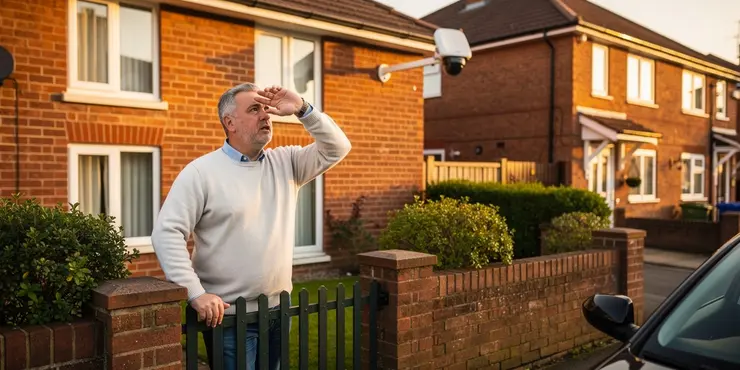
In today's world, security cameras are becoming increasingly prevalent in residential and commercial areas. While they serve to enhance security, it's natural for individuals to want to ensure their privacy is not being inadvertently invaded. If you suspect a security camera might be pointing at your property in the UK, there are several steps you can take to determine its focus and implications.
Observe the Camera's Position
The first step to identifying if a security camera is pointed at your property is a visual inspection. Walk around your property line, and note the physical features of the camera in question. Look for a camera housing that is presumably pointed in the general direction of your property. Cameras often have polycarbonate domes; try to assess the direction in which the lens inside this dome is angled.
Look for Night Vision LEDs
Most modern security cameras are equipped with infrared LEDs for night surveillance. These LEDs often emit a faint red light that becomes visible in low-light conditions. At night, step outside and observe whether you can see any infrared lights pointing towards your property. This can be a clear indication that a camera is directed at you.
Check for Notification Signs
In the UK, the use of CCTV is governed by the Data Protection Act and the Information Commissioner’s Office (ICO) provides guidelines that require areas with CCTV to be marked with clear signage. Check your surroundings for any signs indicating the presence of CCTV and the area they cover. This could give you insights into whether a camera might be monitoring your property.
Ask the Property Owner
If the camera is installed on a neighbouring property, consider having a polite conversation with the property owner. Ask them about the purpose of their camera and whether it includes your property in its footage. Engaging in an open dialogue may not only clarify the camera's view but also foster good neighbourly relations.
Use Technology and Tools
There are online tools and smartphone applications that claim to help determine the direction a camera is pointing. Additionally, certain laser pointers can reflect off lenses, revealing their orientation, although care should be taken not to damage any equipment. Using a combination of simple observations and these technical aids can provide clearer insights into the camera's focus.
Conclusion
Determining if a security camera is pointing at your property requires a combination of observation, communication, and sometimes technological assistance. While security is important, so is maintaining privacy. By following these steps, you can gain a clearer understanding of whether your property is being monitored and take appropriate actions if necessary.
Introduction
Nowadays, there are lots of security cameras in homes and businesses. Cameras help keep us safe, but you might be worried about keeping your privacy. If you think a camera is looking at your home in the UK, there are some things you can do to check.
Look at the Camera's Position
The first thing to do is look at the camera. Walk around your property and see where the camera is pointed. Cameras can have a clear cover. Try to see which way the camera inside is facing. This will help you know if it's aiming at your home.
Check for Night Lights
Many cameras have small lights for seeing at night. These lights are usually red and can be seen when it is dark. At night, go outside and see if you spot any red lights pointing at your home. This shows the camera might be looking at you.
Look for Camera Signs
In the UK, there are rules about using cameras. There should be signs that say where cameras are used. Look around your area for any signs that tell you about cameras and where they are pointing. This can help you know if a camera is watching your home.
Talk to Your Neighbour
If the camera is on a neighbour's property, you can ask them about it. Talk nicely and ask if the camera shows your home. Talking can help you understand what the camera sees and can also help you be friendly with your neighbour.
Try Using Tools
There are tools and phone apps that can help find out where a camera is pointing. Some special lights, like laser pointers, can also show where a camera is looking. Be careful not to damage anything. Using these tools, along with your own eyes, can help you be sure.
Conclusion
To see if a camera is watching your home, you need to look, ask questions, and maybe use some tools. Safety is important, but so is privacy. By doing these things, you can find out if your home is being watched and decide what to do next.
Frequently Asked Questions
Check the physical orientation of the camera. Look at where the lens is directed, as well as any indicators on the camera housing that show its field of view.
Yes, some devices like laser pointers or smartphone apps with augmented reality can help visualize camera fields of view by simulating lines of sight.
PTZ stands for pan-tilt-zoom. These cameras can change direction and zoom in and out, which means they can potentially be adjusted to view areas outside their current focus.
Yes, many security cameras use infrared LEDs for night vision, which are not visible to the naked eye but may be detected with special equipment.
Some cameras have visible LED indicators that show when they are recording, but this is not always reliable as indicators can be disabled.
Yes, having a polite conversation with your neighbor can help clarify any concerns with camera placement and privacy.
First, communicate with the owner of the camera. If necessary, consult local laws regarding privacy and the use of security cameras.
Many modern cameras have remote viewing capabilities, allowing them to be monitored through internet-connected devices.
Operational cameras may have visible LEDs, motor sounds if equipped with movement capabilities, or they might be enclosed in weatherproof housing.
Strategically planted trees or fences can obstruct the line of sight of cameras from outside your property.
The range varies but many cameras cover areas between 50 and 100 feet.
Yes, many are equipped with night vision capabilities such as infrared LEDs to record in low-light conditions.
Yes, many jurisdictions have laws preventing cameras from recording areas that violate reasonable expectations of privacy, such as inside homes without consent.
Wireless cameras are generally easier to reposition than wired ones due to the absence of connection cables.
Yes, reflections on shiny surfaces like windows can sometimes show the direction a camera is pointing.
Yes, tampering with someone else's property, including security cameras, is illegal.
Yes, a zoom lens allows a camera to focus on distant objects, effectively increasing its field of view.
Visually inspect the area for physical obstructions like buildings, fences, or dense foliage that may block the camera's line of sight.
Consider legal advice or reaching out to local authorities if a resolution cannot be reached through direct communication with the camera owner.
Yes, dummy cameras are sometimes used as deterrents. They don't record but can still impact the perception of privacy due to their presence.
Look at the way the camera is pointing. Check if the lens is facing the right way and see any signs on the camera to see what it can see.
Yes, some tools can help you see where a camera can look. You can use things like laser pointers or apps on your phone that use special technology to show lines of sight.
PTZ means pan-tilt-zoom. These cameras can move side to side and up and down. They can also zoom in and out. This lets them look at different things around them.
Yes, lots of security cameras use special lights called infrared LEDs. These lights help the camera see at night. You can't see these lights with your eyes, but some special tools can see them.
Some cameras have little lights that show when they are recording. But sometimes, these lights don't work because they can be turned off.
Talking nicely with your neighbor can help fix any worries about where the camera is and privacy.
First, talk to the person who owns the camera. If you need to, you can look at the rules about privacy and using security cameras where you live.
Today, many new cameras let you see what they see from far away. You can use your phone or computer if it's connected to the internet.
Cameras that are turned on might have small lights you can see. They might make a noise if they can turn or move. Sometimes, they are in special cases to keep them safe from the weather.
You can plant trees or put up fences in smart places. This helps block cameras so they can't see your home.
Cameras can see things far away. Most cameras can see between 50 and 100 feet.
Yes, many cameras can see at night. They use special lights called infrared LEDs to help them see when it's dark.
Yes, many places have rules that stop cameras from recording where it's private, like inside homes, without asking first.
Wireless cameras are easier to move around because they don't have cables that need to be plugged in.
Yes, reflections on shiny things like windows can sometimes show where a camera is pointing.
It is against the law to mess with things that are not yours, like cameras that keep places safe.
Yes, a zoom lens helps a camera see far away things. It makes the camera look at more stuff at once.
Look around to see if anything is blocking the camera. See if there are buildings, fences, or lots of leaves that might be in the way.
If talking to the person who owns the camera doesn't work, you can ask for help. You can talk to someone who knows about the law, like a lawyer. Or, you can ask the local authorities, like the police, for help.
Yes, fake cameras are sometimes used to scare people. They don't record anything, but they can make people think they are being watched.

Ergsy Search Results
This website offers general information and is not a substitute for professional advice.
Always seek guidance from qualified professionals.
If you have any medical concerns or need urgent help, contact a healthcare professional or emergency services immediately.
Some of this content was generated with AI assistance. We've done our best to keep it accurate, helpful, and human-friendly.
- Ergsy carefully checks the information in the videos we provide here.
- Videos shown by Youtube after a video has completed, have NOT been reviewed by ERGSY.
- To view, click the arrow in centre of video.
- Most of the videos you find here will have subtitles and/or closed captions available.
- You may need to turn these on, and choose your preferred language.
- Go to the video you'd like to watch.
- If closed captions (CC) are available, settings will be visible on the bottom right of the video player.
- To turn on Captions, click settings.
- To turn off Captions, click settings again.